Split Bills Smarter,
Settle Faster
The easiest way to split expenses with friends. Track shared costs, settle up with one tap, and never worry about who owes what.
Everything You Need to Split Bills
Powerful features that make splitting expenses effortless
Smart Settle
Our intelligent algorithm minimizes the number of transactions needed to settle up. Pay or get paid in one go instead of multiple transactions.
Group Expenses
Create groups for trips, roommates, or any shared expense. Track who paid what and who owes whom in real-time.
Real-time Balance
See exactly who owes you and who you owe at a glance. Track your balance across all groups in one place.
Works Offline
No signal? No problem. Add expenses anytime, even without internet - they sync automatically the moment you’re back online.
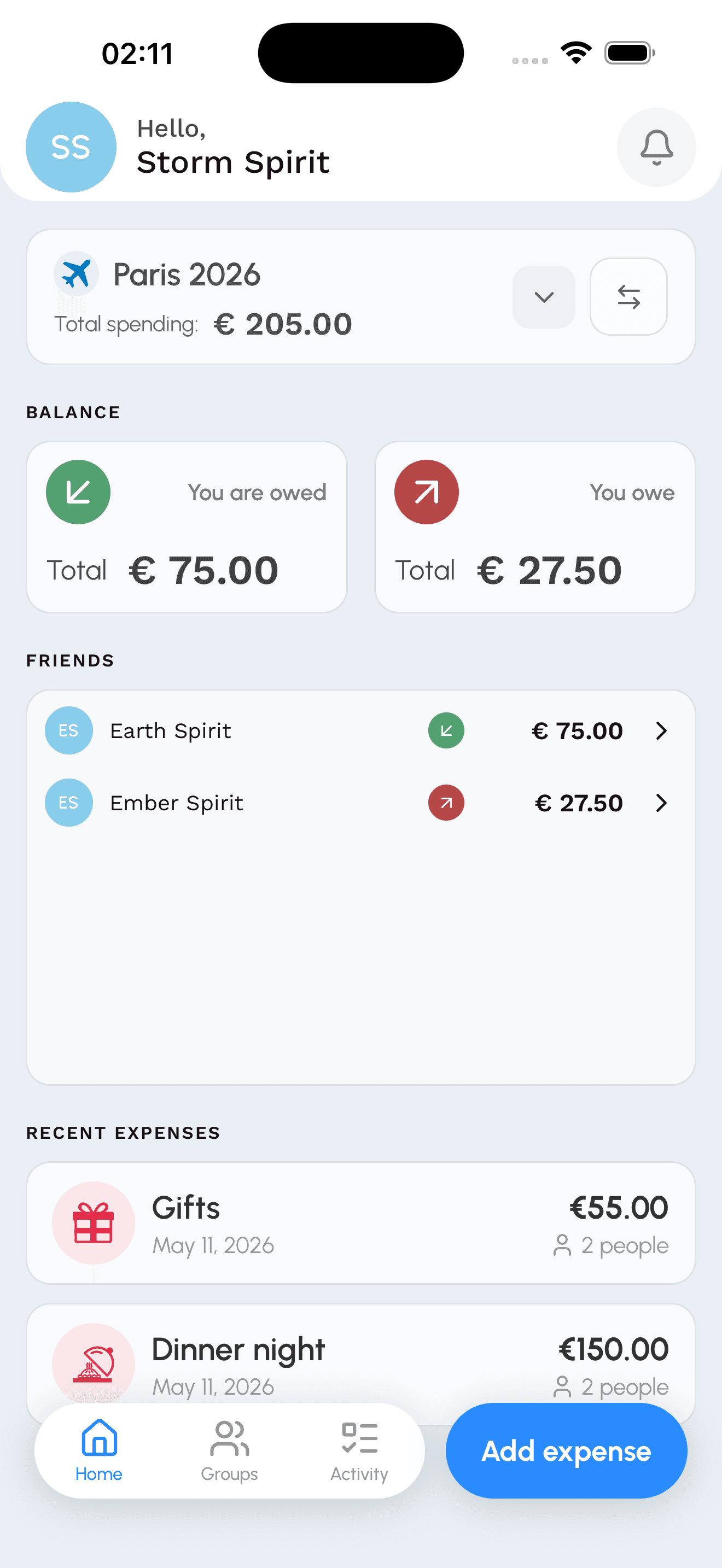
Track All Your Expenses in One Place
View all your shared expenses, group balances, and recent activity on a beautiful, intuitive home screen. Stay on top of who owes what with real-time updates.
- See all expenses at a glance
- Track balances across multiple groups
- Quick access to recent activity
Settle Up with One Tap
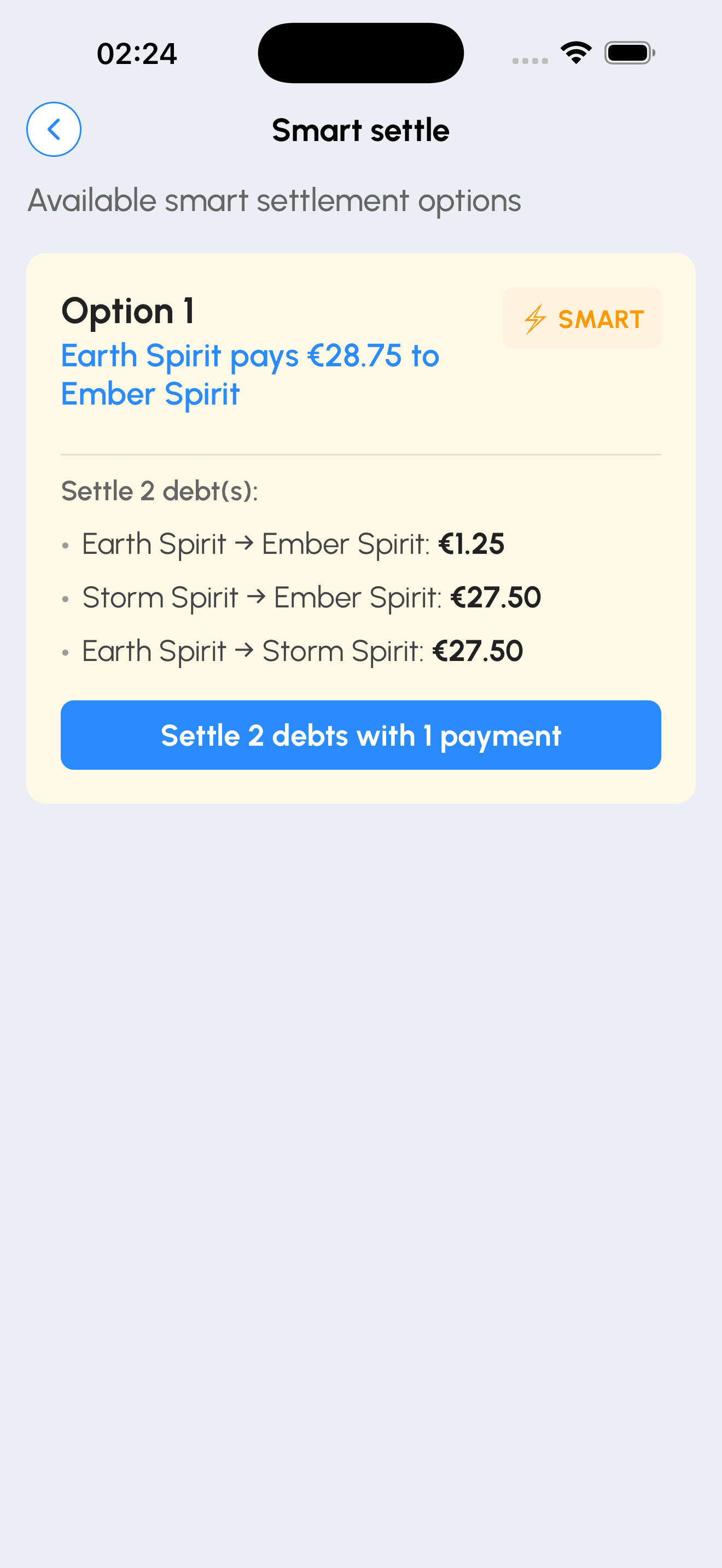
Our intelligent Smart Settle algorithm automatically calculates the minimum number of transactions needed to settle all debts in your group. No more complicated payment chains.
- Minimize payment transactions
- Optimized settlement paths
- One-tap payment recording
Detailed Expense Tracking
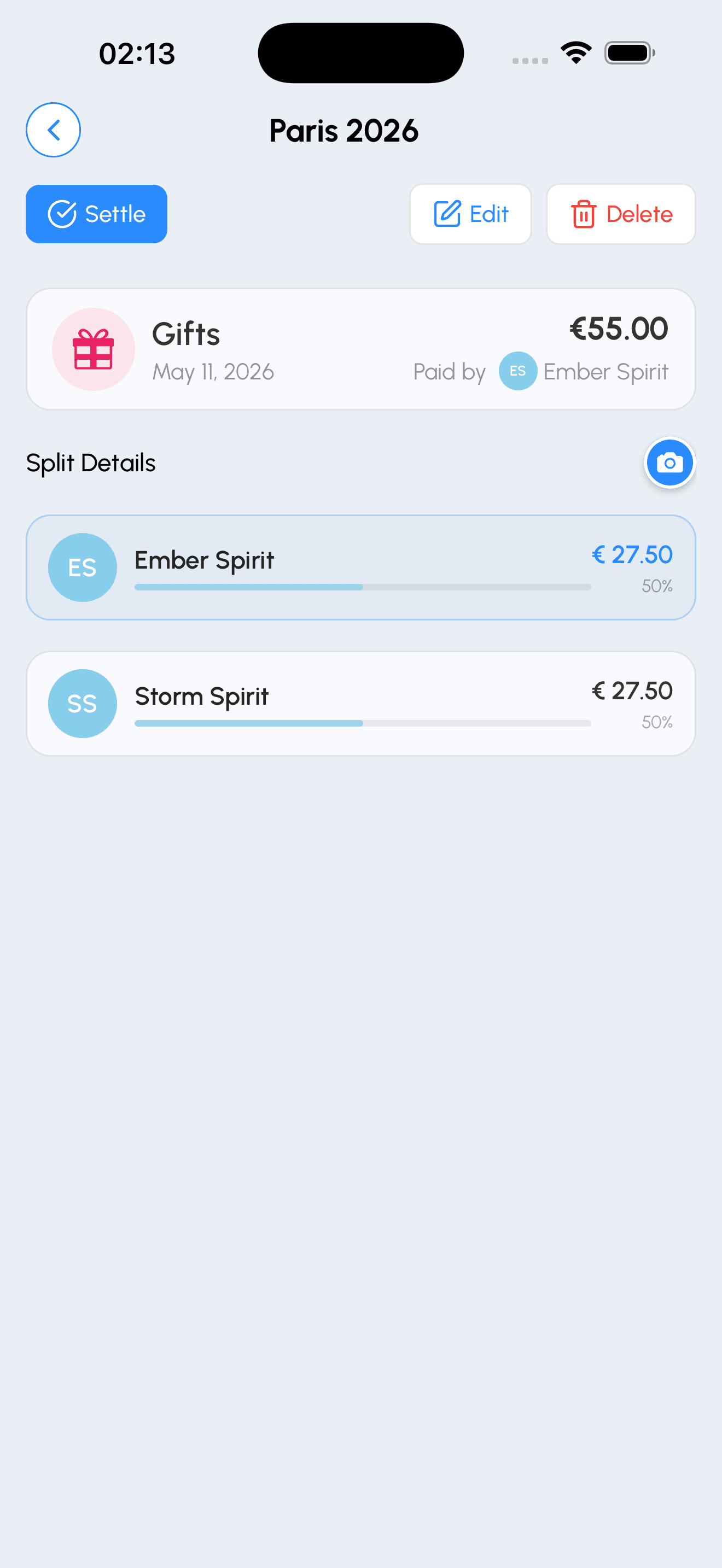
View complete expense details including who paid, how it’s split, receipts, and notes. Edit or settle expenses with just a few taps.
- See complete expense breakdown
- Attach receipts and add notes
- Easy expense editing and settling
Settle Individual Friends
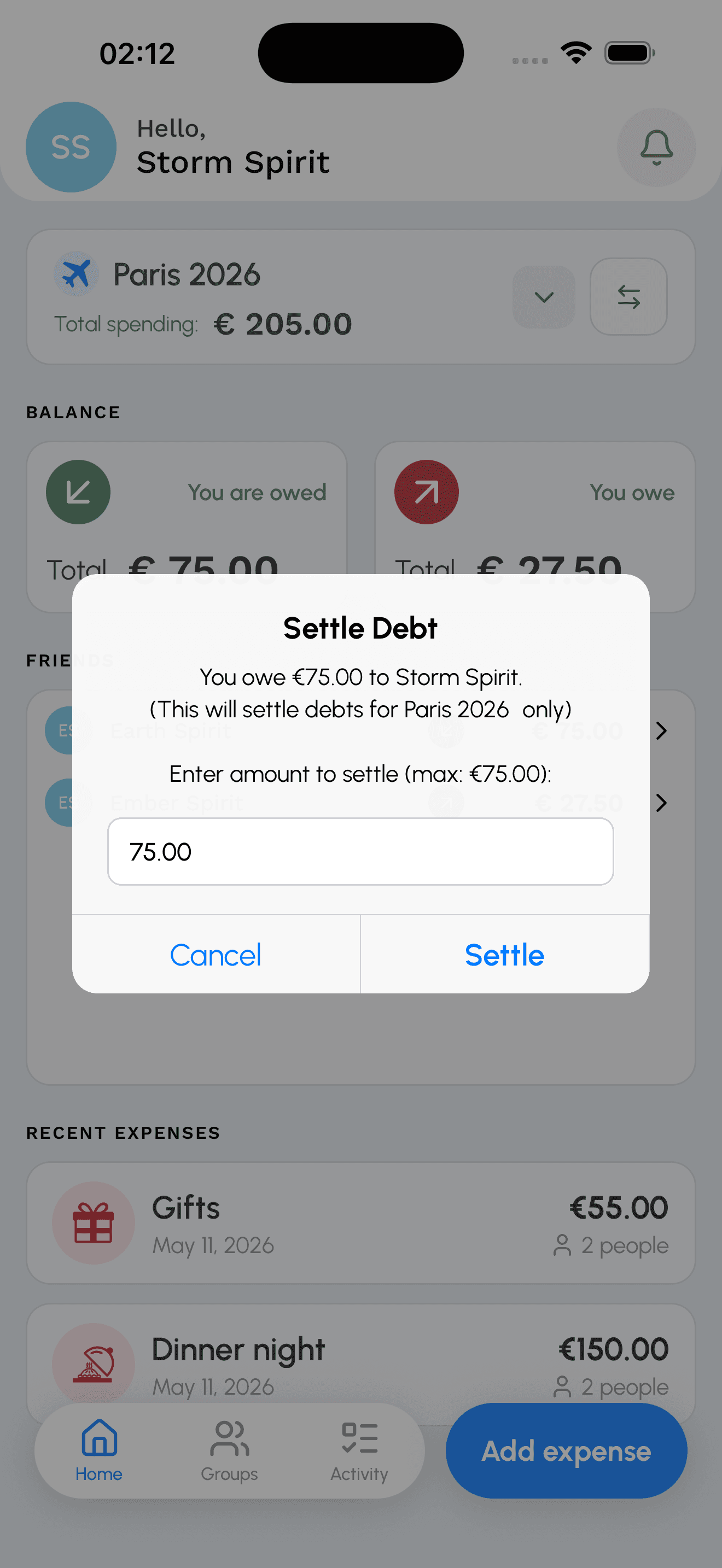
Quickly settle up with individual friends. See your balance history, choose a payment method, and mark payments as complete with a single tap.
- View balance with each friend
- Record settlements instantly
- Track payment history
How Smart Settle Works
Say goodbye to complicated payment chains. Our algorithm finds the optimal way to settle debts.
Without Smart Settle
Traditional settling requires multiple transactions:
3 transactions needed
With Smart Settle ✨
Optimized to just one transaction:
Only 1 transaction needed! 🎉
How it works:
- 1
Analyze all debts in your group
Our algorithm looks at who owes what to whom
- 2
Find optimal settlement path
Calculate the minimum number of transactions needed
- 3
One-tap settlement
Settle multiple debts with a single optimized transaction
Simple, one-time pricing
No subscriptions. Start free, pay only for what you need.
Every account starts free
3 Groups · 30 Expenses per Group · 3 AI Receipt Scans
Add-ons
Extra Group
$0.99
Create one more group. Yours forever.
- Adds 1 group to your account
- Stays on your account forever
Unlimited Expenses
$1.99
Unlimited expenses for one group. Forever.
- Removes the 30-expense limit for a group of your choice
- Everyone in the group benefits
AI receipt scans
Starter
$0.99
10 scans · $0.099 / scan
Best for occasional use.
Popular
$1.99
30 scans · $0.066 / scan
The everyday choice.
Best Value
$2.99
50 scans · $0.060 / scan
Lowest cost per scan.
Bundles
Groups, unlimited expenses, and AI receipt scans — together for less.
🌱 Splitap Circle
$2.99
Saves $0.98
- +1 Group
- Unlimited expenses for one group
- 10 AI receipt scans
⭐ Splitap Flow
$3.99
Saves $1.96
- +2 Groups
- Unlimited expenses for one group
- 20 AI receipt scans
🚀 Splitap Beyond
$4.99
Saves $2.95
- +3 Groups
- Unlimited expenses for one group
- 40 AI receipt scans
All purchases are one-time. No subscriptions, no recurring charges.
Talk to Splitap with AI
Connect Splitap to Claude, ChatGPT, or any AI assistant and just ask — no menus, no forms.
Ask
“How much does Alice owe me this month?”
Ask
“Show me all unsettled expenses in my Trip group.”
Ask
“What did we spend on food last weekend?”
Set it up in 3 steps
- 1
Open Splitap on your phone
Go to Profile → AI Access and tap “Generate key”.
- 2
Copy the key
It’s shown once — copy it right away. You can always regenerate later.
- 3
Paste it into your AI assistant
In Claude, ChatGPT, Cursor, or any AI tool that supports custom connections, add Splitap as a connection using your key. Then just ask questions in plain English.
Copy-paste configs for Claude Desktop, Claude Code, Cursor, and more.
Your key only works with your Splitap data — we never see your AI conversations.
Frequently Asked Questions
Everything you need to know about Splitap
How does Splitap work?▼
Splitap helps you track shared expenses with friends, family, or roommates. Simply create a group, add expenses, and the app automatically calculates who owes what. Our Smart Settle feature then finds the optimal way to settle all debts with the minimum number of transactions.
Is Splitap free to use?▼
There’s no subscription — you only pay for what you use. Every account starts free with 3 groups, 30 expenses per group, and 3 AI receipt scans. When you need more, one-time purchases add extra groups, unlimited expenses for a group, or scan credits — and everything you buy is yours forever.
Does Splitap handle payments?▼
No, Splitap is a tracking tool only. We help you keep track of who owes what and calculate the optimal settlement path, but actual payments are made directly between users using your preferred payment method (cash, Venmo, PayPal, etc.).
What is Smart Settle?▼
Smart Settle is our intelligent algorithm that analyzes all debts in your group and calculates the minimum number of transactions needed to settle everyone up. Instead of multiple back-and-forth payments, you might only need one or two transactions to clear all balances.
Can I use Splitap for different types of expenses?▼
Absolutely! Splitap works great for trips, roommate expenses, group dinners, shared subscriptions, utilities, and any other shared costs. You can organize expenses by category and create separate groups for different purposes.
How do I invite people to my group?▼
After creating a group, you can invite people by sharing an invite link or sending them an in-app notification. They’ll need to download the app and create an account to join your group and start tracking expenses together.
Can I edit or delete expenses?▼
Yes! You can edit or delete any expense you created. All group members will see the updated information, and balances will be recalculated automatically to reflect the changes.
Still have questions?
Contact our support teamReady to Split Smarter?
Join thousands of users who are already saving time and avoiding payment hassles